Case study · Client project
A job tracker for a signage and interior fit-out contractor
A tracker that follows a fit-out job from design through procurement, production and installation, with a role for each department, a checklist gate at every stage, and a link the client can watch without logging in.
At a glance
The project in brief
- Business: designs, fabricates and installs signage, lighting and interior branding for retail, hospitality and commercial clients
- What we built: a single tracker with five logins, an owner view plus design, procurement, production and installation departments
- Scope: project intake, stage-gated checklists, due-date tracking, a client-facing tracking link and a live activity feed
- Team: MetaNova AI delivery and engineering from Hyderabad
The challenge
A job that passes through four hands before it is done
The business runs dozens of fabrication and installation jobs at once, each one moving through the same four stages: design, procurement, production and installation. Every stage sits with a different team, and a job cannot move to the next one until the current one is actually done, not just believed to be done.
Before the tracker, that handoff lived in phone calls and shared spreadsheets. A production team could start cutting material before a client had signed off on the design. A job could sit waiting on a part for days before anyone upstream noticed. Clients who asked for an update got whatever answer was fastest to give, not necessarily the true one.
The owners wanted one place where every job's real position was visible, where a stage could not be marked done until its own checklist was actually satisfied, and where a client could check progress without a phone call.
What we set out to do
Four goals we agreed before writing code
- Give every department its own login and its own queue, so nobody sees controls that are not theirs
- Gate every stage behind a checklist specific to that stage, so a job cannot silently skip ahead
- Make a job's true position visible to the owner at a glance, across every job at once
- Let a client watch a job's progress through a link, with no account and no back-and-forth
How we approached it
The stages the business already uses, enforced in software
Map the four stages as the departments already name them
We used the business's own stage names, design, procurement, production and installation, and its own department boundaries instead of inventing new ones, so the system matched how people already talked about a job.
Write the checklist for each stage with the department that owns it
Each stage has its own short set of yes or no requirements, for example whether site dimensions have been verified before design is considered complete. We wrote these with the department doing the work, not from the outside.
Separate the owner's view from the floor's view
The owner sees every job, every stage and every deadline in one dashboard. Each department sees only the jobs waiting on it. The same data, two different shapes, each useful to the person looking at it.
Add the client-facing link last
Once the internal tracker was solid, we added a read-only tracking link per job that a client can open without signing in, showing the stage, the progress and the deadline, nothing internal.
What we built
From intake to installation
A dashboard that shows every job's real position
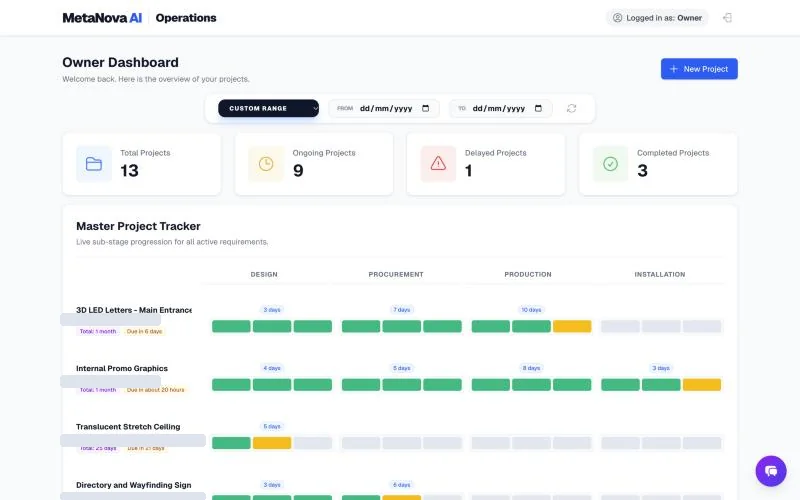
The owner's home screen counts total, ongoing, delayed and completed projects, and lists every active job with a stage-by-stage progress view and a due date. Delayed jobs are visibly flagged rather than buried in a list.
Stage-gated checklists
A department cannot mark its stage complete until its checklist is satisfied. Each requirement is a specific yes or no question the department itself agreed to, for example whether site dimensions are verified before design closes.
Department queues, not one shared inbox
Design, procurement, production and installation each sign in to see only the jobs currently waiting on them, with the information relevant to that stage, not the whole job history.
A client-shareable tracking link
Every job gets a link the client can open directly, showing stage, progress and deadline, with nothing about internal approvals, costs or staff.
A live activity feed
Stage completions, flagged issues and delays post to a running feed in near real time, so the owner sees what changed today without opening every job.
Per-job detail with description and timeline
Each job carries its own description, tentative start date, final deadline and a full lifecycle view across all five stages, including the completed state.
Design decisions
The choices that made it work
Checklists as gates, not reminders
A checklist that only reminds is a checklist that gets skipped. Making the next stage unreachable until its gate is satisfied was the one change that actually stopped jobs from silently jumping ahead.
One dashboard per role, not one dashboard for everyone
An owner needs breadth across every job. A department needs depth on the few jobs waiting for it. We built two different views over the same data rather than one compromise view that served neither well.
A tracking link instead of a client account
A client checking on one job does not want to create an account. A stable, unlisted link tied to that job answers the same question with none of the friction.
Delays surfaced, not hidden in averages
The dashboard counts delayed projects as their own number, separate from ongoing, so a delay cannot get lost inside a healthy-looking total.
Under the hood
How it is built
- Next.js and React with TypeScript
- Role-based logins for the owner and each of the four departments
- A relational database with one job as the source of truth for its stage, checklist state and timeline
- Per-job public tracking pages that read the same data without exposing internal fields
- An activity feed built from the same stage-change events that drive the dashboard
The result
What changed for the business
- One dashboard shows every job's true stage, not a reported one
- A stage cannot close until its own checklist is actually satisfied
- Each department works from its own queue instead of a shared spreadsheet
- Clients get a live answer from a link instead of a phone call
- Delays are visible the day they happen, not discovered at the deadline
What comes next
Where this goes next
- Automatic client notifications when a job's stage changes
- Photo capture at each stage, attached to the job record
- A capacity view across jobs, so the owner can see which department is the current bottleneck