
Case study · Client project
An opportunity-to-dispatch platform for a building materials manufacturer
A platform that follows an order from first enquiry through quality control, R&D, technical review, finance and production to dispatch, with an SLA clock on every stage and escalation that reaches the right person automatically.
At a glance
The project in brief
- Business: manufactures construction chemicals such as tile adhesive, wall putty and waterproofing compound, sold to real estate developers and builders
- What we built: a department-by-department pipeline from sales opportunity to dispatch, plus an admin control centre
- Scope: six department logins, SLA tracking and escalation, inventory-aware job routing, audit log and analytics
- Team: MetaNova AI delivery and engineering from Hyderabad
The challenge
Six handoffs, and nobody owned the view across all of them
An order for this business is not a single handoff, it is six: sales takes the opportunity, quality control checks it, R&D and technical review weigh in, finance approves, and production and dispatch deliver. Each department had its own way of tracking its own queue, and nobody owned the view across all six.
That meant an order could sit for days at a stage nobody was watching, with no signal until a client called asking where their order was. Raw material shortages were discovered on the production floor, after a job had already been scheduled against stock that was not actually there.
The company wanted a single pipeline everyone trusted, a clock that actually enforced itself instead of relying on someone to notice a delay, and a production schedule that already knew what was and was not in stock.
What we set out to do
Four goals we agreed before writing code
- Give sales, QC, R&D, technical, finance and production each a queue with only what is theirs
- Put an SLA clock on every stage, with automatic escalation when it is missed
- Check raw material stock before routing a job to production, not after
- Give the owner one control centre across every active order and every department
How we approached it
A pipeline with a clock and a safety net built in
Model the six-department pipeline as it actually runs
We mapped the real sequence, sales through dispatch, and the real exit criteria for each stage, before deciding what the software would enforce.
Attach an SLA to every stage, not just the whole order
Each department gets its own time budget. An order sitting too long at technical review is a technical review problem, visible as one, not folded into a vague total.
Design escalation as a ladder, not a single alert
We built three tiers so the right person hears about a delay at the right point: the stage's own department head first, then the functional head, then the CEO if it is still unresolved.
Wire inventory into the routing decision
Before a job moves to production, the system checks the raw materials it needs against live stock. If a key material is below its safe threshold, the job is routed to purchase instead of the floor.
What we built
From opportunity to dispatch
A pipeline with one home for every order
Every order moves through sales, QC, R&D, technical review, finance, and production and dispatch as a single record, so its full history survives every handoff.
Department queues with their own login
Each of the six functions signs in to its own queue, sees the orders currently waiting on it, and moves an order forward or raises an issue against it.
An SLA clock per stage
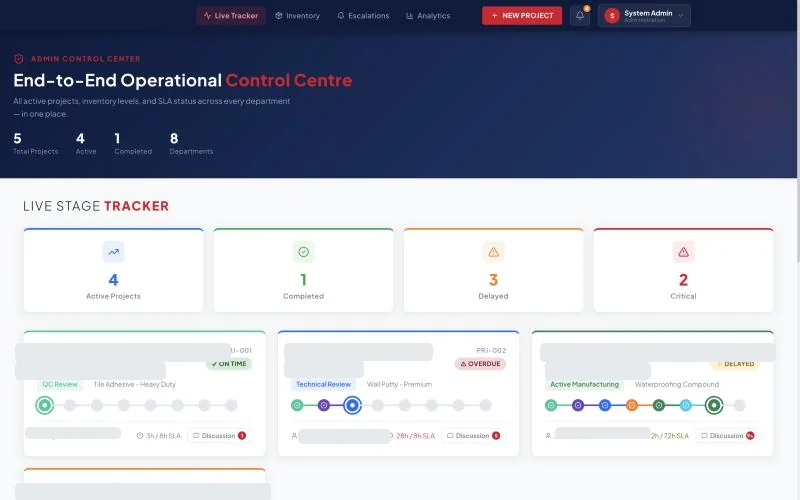
Every stage carries its own time budget. The control centre shows exactly how long an order has been sitting against that budget, as a percentage, not just a raw duration.
Three-tier escalation
Past the SLA, an order escalates to the department head. Past one and a half times the SLA, the functional head is looped in. Past two and a half times, it becomes a CEO alert. Nothing waits on someone remembering to chase it.
Inventory-aware job routing
Raw materials are tracked against a safe level and a critical level. If a material a job needs has dropped below its safe threshold, the next production job that needs it is rerouted to purchase automatically instead of being scheduled against stock that is not really there.
An admin control centre and audit trail
The owner sees total, active and completed orders, every department's current load, and a full audit log of who moved what, when, across the whole pipeline.
Design decisions
The choices that made it work
An SLA per stage, not one deadline for the whole order
A single end-to-end deadline tells you an order is late. A per-stage SLA tells you which department made it late, which is the only version of that fact anyone can act on.
A three-tier ladder instead of one alert
One alert gets dismissed. A ladder that gets louder the longer a delay sits unresolved reaches someone with the authority to actually fix it, without paging the CEO over every minor slip.
Inventory checked at routing time, not at the floor
Catching a shortage at the point a job is scheduled, rather than the point someone tries to pull the material, turns a production stoppage into a purchase order.
Six logins instead of one shared account
Giving each department its own login and its own queue made the system match how the business is actually organised, and made the audit trail meaningful, because every action is attributable.
An audit log as a first-class feature, not an afterthought
In a regulated, multi-department pipeline, being able to show exactly who approved or rejected what, and when, matters as much as the pipeline itself.
Under the hood
How it is built
- Next.js and React with TypeScript
- Role-based logins for six departments plus an administrator control centre
- A relational database with per-stage SLA timers computed from stage-entry timestamps
- Inventory levels checked against safe and critical thresholds at job-routing time
- An audit log table recording every stage transition and approval decision
- An analytics view over order volume, stage duration and department load
The result
What changed for the business
- One pipeline, six departments, everyone working from the same record
- Delays are visible the moment a stage misses its own SLA, not discovered later
- Escalation reaches the right person automatically, without someone deciding to chase it
- Production is never scheduled against stock that is not actually there
- Every approval and rejection across the pipeline is attributable and auditable
What comes next
Where this goes next
- Predictive alerts before an SLA is missed, not just after
- A supplier-facing view for purchase orders raised by the inventory reroute
- Capacity forecasting across departments from historical stage durations